by admin | Dec 26, 2013 | Technical, Videos
Amazing Quality from our Traditional Press
This label is a beautiful combination of form and function. The label has a stunning design that required excellent prepress, platemaking, and pressman ship to look this good. It also had to stand up to harsh a harsh environment without fading or scuffing. Rose City Label rose to the challenge and delivered and excellent quality label.
Despite the growth of digital printing in our business, traditional, long run printing is still over 80% of our work. The press set up time and cost quickly pays for itself because of the speed and quality of the finished product. And, we have many more options for die cutting, lamination, and finishing on the traditional press. Digital is the future of printing, but this type of long run, high quality work on our traditional presses isn’t going away any time soon.
Call us today if you have a challenging label project – 800-547-9920. Thank you.
by admin | Dec 7, 2013 | Customers/Examples, Technical
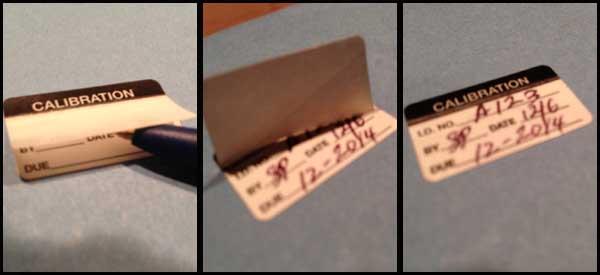
This label shows off more of the complex converting capabilities at Rose City Label. Converting is all the important stuff we do on our press after the ink is laid down. This includes:
- Laminating
- Die cutting
- Perforating
- Under scoring
- Top scoring
This particular example shows a specialty laminate that allows the end user to fill in the variable information at the job site and then lay down the lamination after the writing is completed.
This flap lamination allows the variable (ball point pen) information to be protected by the laminate — much more durable than writing over the top of the lamination.
Flap lamination is tricky, and it costs a little more than standard lamination, but if your project requires this type of protection, we can help.
Call us today for all your challenging label projects. Thank you for your support.
by admin | Oct 31, 2013 | Company News, Technical
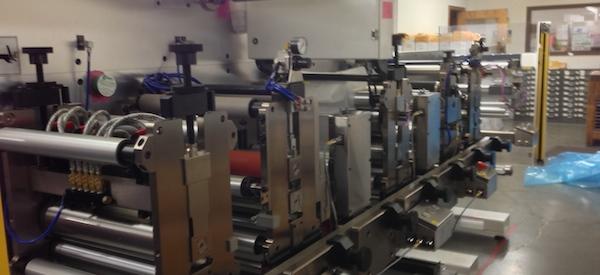
Our new high speed digital die cutter is finally here! Next week it will be powered up and a full week of factory training will get us up and running quickly.
What does this mean for you?
- Digital Printing is now viable at a much, much higher quantity
- More jobs with no plates and setup fees
- More jobs with lower waste and environmental impact
- More capacity in our plant to get you FASTER DELIVERY TIMES!
Thank you for all your support as we have grown and evolved in the past few years. Adding more capacity will allow us to help even more companies with beautiful labels to help their products sell! Call us today to learn more about this amazing technology.
by admin | Sep 5, 2013 | Company News, Technical
Rose City Label President Scott Pillsbury presented to over 300 label printers and suppliers at the 2013 TLMI Tech Conference.

The subject of the presentation was Rose City Label’s entry into the growing world of digital label printing. Pillsbury discussed the equipment selection, marketing, and lessons learned from the addition of this new technology. Company culture, risk profile, and pitfalls to avoid were also discussed. As one of the oldest label printers in North America, many were excited to see how the company is embracing new technology.
Download presentation slides by clicking here.
The presentation was followed by a lively Q & A session and was one of the most popular presentations of the conference.
To learn more about the presentation, or to see how this technology can help you, please contact us today.
by admin | Aug 23, 2013 | Technical
RGB and CMYK Color Modes
Ever see a picture on the internet or on your computer monitor that looks bright and vivid in color? Then you go to print it out and think, “It doesn’t look like this on my screen.”
There are several factors that can contribute to this. One of these factors is color mode.
When a user generates graphics on a computer for printing, or wishes to print images from a digital camera, it is a common mistake to assume that the colors seen on the screen will look the same in print. The issue lies in the fact that the computer screen and many photo editing programs show colors in Red-Green-Blue (RGB) mode, while images are printed on paper in Cyan-Magenta-Yellow-Black (CMYK) format.
In order to print properly, any image files that you supply for CMYK printing must be in CMYK mode. RGB files will look good on screen, and they will even look good when printed on many of the desktop color printers on the market today, however, they will not separate properly when the file is used to make printing plates. The resulting full printing job will not look the way you expect it to look. The RGB scheme has a greater range of colors than CMYK and can produce colors that are more vivid and vibrant. These colors are beyond the range of CMYK to reproduce and will come out darker and more dull in print than what is seen on the monitor or display. Sometimes the conversion from RGB to CMYK works without any problems arising, and a printout will look identical to what shows up on the computer. In other cases, there will be noticeable differences between the shades of color. The key to avoiding this potential problem is to convert all graphics to CMYK format during the layout design phase.
Even though it can be minimal, you can still see the difference in brightness on the photos below
RGB CMYK


by admin | Aug 16, 2013 | Customers/Examples, Technical
Even the greatest pressman can battle with registration on the press.
What happens when misregistration occurs and you have type on your label? Your text becomes “fuzzy” and hard to read.
How do you avoid this? Add a keyline.
A keyline, in graphic design, is a boundary line that separates color and monochromatic areas or differently colored areas of printing on a given page or other printed item. The line itself, usually consisting of a black (or other dark colored) border, provides an area in which lighter colors can be printed with slight variation in registration. It keeps type looking “clean” as we say and is usually not even noticeable.

